
Choosing between a Kindle and an iPad is the ultimate packing dilemma. It usually comes down to the length of your flight and whether you are in the mood to dive into a good book or binge-watch a new series.
While most planes offer decent in-flight entertainment these days, hopping on a connecting flight with no screens can make you instantly regret your packing choices. Having your own entertainment downloaded makes all the difference. With Netflix downloads, Kindle Unlimited, and Apple Books, you can pack an entire library and watch list without relying on spotty in-flight Wi-Fi.
So, which tablet should you actually bring? Here is a breakdown of the pros and cons of each to help you decide.
The Versatile Heavyweight: iPad Air
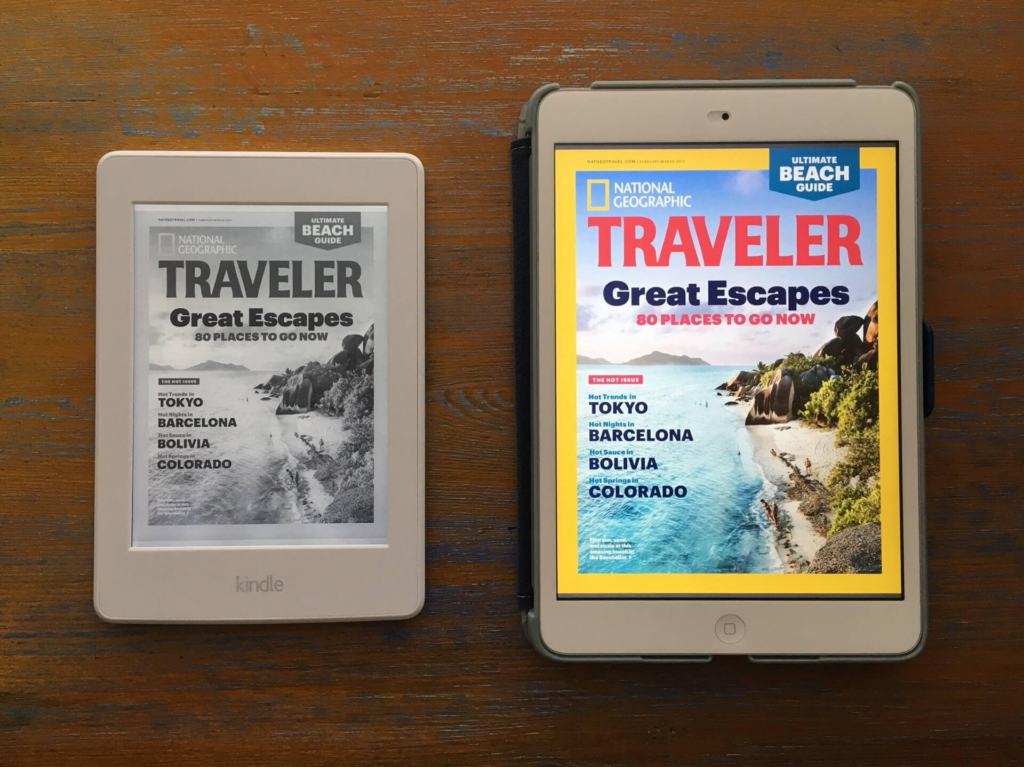
The iPad Air is a fantastic go-to for longer flights when you want multiple entertainment options or need to tackle a little bit of work. At home, it is incredibly useful in the kitchen for following recipes or watching YouTube tutorials.
PROS
- Watch movies and TV shows (an absolute essential for 12-hour flights).
- Read digital magazines exactly as they are printed.
- Access Apple Books, the Kindle app, and the Libby app all in one place.
- Perfect for kitchen use, recipes, and video tutorials.
CONS
- Heavy screen glare makes it difficult to use poolside or outdoors.
- Battery life maxes out around 10 hours, meaning you will need a charger.
- It is heavier to hold (the 11-inch model weighs about 16 oz).
- More expensive, with prices generally starting around $599.
- Prone to digital distractions if you are trying to disconnect.
The Goldilocks Middle-Ground: iPad Mini
If the Air feels too bulky, the iPad Mini is an excellent alternative. At around $499, it is more budget-friendly and super compact for travel. The 8.3-inch screen is large enough to enjoy your favorite shows but small enough that it won’t weigh down your carry-on bag. It offers the perfect middle ground between size and functionality.
The Digital Detox Champion: Kindle Paperwhite
The Amazon Kindle Paperwhite is strictly for reading, but as an e-reader, it simply cannot be beat. When you want a true vacation and a complete digital detox, this is the device to bring. You can download all your favorite books without the constant temptation of social media or email notifications buzzing in the background.
PROS
- Incredibly lightweight at just 7.2 oz (easily held with one hand).
- Zero screen glare, allowing you to read in direct sunlight at the beach.
- Exceptional battery life that lasts up to 12 weeks per charge.
- Highly affordable, generally priced around $160.
- Seamlessly download free library books through the Libby app.
- Highly durable design that can survive a few accidental drops.
- Forces you to unplug, relax, and focus.
CONS
- Strictly for books; no movies, apps, or TV shows.
- Magazines are text-only, losing their visual layout.
- Can feel restrictive if you want varied entertainment on a long travel day.
Head-to-Head Comparison
| Feature | iPad Air / Pro | iPad Mini | Kindle Paperwhite |
| Primary Use | Movies, Work, Web, Reading | Movies, Web, Reading | Reading Only |
| Weight | ~16 oz | ~10.6 oz | ~7.2 oz |
| Battery Life | ~10 Hours | ~10 Hours | Up to 12 Weeks |
| Screen Glare | High (Poor in sunlight) | High (Poor in sunlight) | None (Perfect for the beach) |
| Distraction Level | High | High | Zero |
Which One Should You Pack?
Pack the Kindle if:
- You are going on a beach vacation and need a glare-free screen.
- You desperately want a real digital detox without notifications.
- You are a voracious reader who will easily finish multiple books.
- You are trying to pack as light as humanly possible.
- Your flight already has great in-flight entertainment screens.
Pack the iPad if:
- You are facing a massive long-haul flight and need varied entertainment.
- You want to catch up on your favorite shows and movies.
- You enjoy reading magazines in their full, colorful format.
- You need to answer emails or do a little work on your trip.
- You don’t mind carrying a charger and finding a power outlet.