Are you looking for the best AI hardware to upgrade your life in 2026? For the last three years, the “AI Revolution” has lived entirely on our screens. We chatted with bots and automated emails, but we did it all on the same boring rectangles—smartphones and laptops—we have used for a decade.
Now, AI is finally breaking out of the screen. The top AI hardware devices of this year promise to kill the “App” model entirely. Instead of opening Uber, tapping a destination, and confirming payment, you simply press a button on a gadget and say, “Get me a car,” and the AI does the rest.
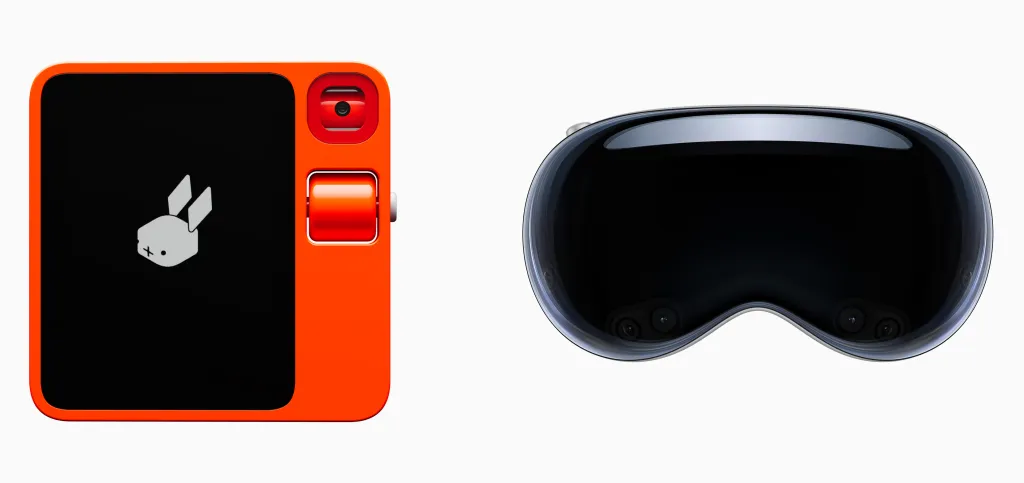
Yet, the market is messy. On one side, you have budget-friendly “AI Companions” like the Rabbit R1. On the other side, you have ultra-premium “Spatial Computers” like the Apple Vision Pro. Here is a breakdown of the best AI hardware available to see which one is the future and which is just a toy.
1. Apple Vision Pro (The Masterpiece)
Let’s get the elephant out of the room. The Apple Vision Pro is not just a headset; it is a face-mounted supercomputer. With the 2026 updates (visionOS 2 and the rumored M5 chip), it has matured from a tech demo into a productivity monster.
- Best For: Developers, Designers, and Productivity maximalists.
- Price: $3,500+
- Spatial Computing: It doesn’t run apps in a small window; it puts them in your room. You can have a 100-inch movie screen on your ceiling and a 3-monitor coding setup floating above your desk, effectively giving you infinite desk space.
- Eye Tracking: This is the most “magical” AI interface in existence. You don’t need a mouse. You look at a button, tap your fingers together, and it clicks. It feels telepathic.
- The Downside: It is a massive financial investment, not a casual gadget. Additionally, it is heavy to wear for more than two hours.
2. Rabbit R1 (The Comeback Kid)
When the Rabbit R1 first launched, it was buggy. But in 2026, after the “RabbitOS 2” update, it has become the cult favorite of the tech world.
- Best For: Students, Tinkerers, and “Digital Detox” seekers.
- Price: $199
- The Large Action Model (LAM): Unlike Siri, which just gives you links, Rabbit does things. Hold the button and say, “Order a pepperoni pizza from Domino’s,” and it actually navigates the website, puts it in the cart, and pays.
- Vibe Coding: This is the 2026 breakout feature. You can ask the Rabbit to “Build me a snake game,” and it writes the code and plays it on the screen instantly.
- The Appeal: It is an impulse buy. It looks cool and acts as a fun secondary device to keep you off your phone.
3. Ray-Ban Meta Smart Glasses (The Invisible Winner)
While everyone was arguing about Rabbit vs. Humane, Meta quietly won the war for your face.
- Best For: Everyday users and Social Media creators.
- Price: $299
- Form Factor: They look exactly like normal sunglasses. No cameras sticking out, no heavy battery. Put them on, and you have AI.
- Multimodal AI: You can look at a broken blender and ask, “Hey Meta, look and tell me how to fix this.” The glasses analyze what you are seeing and whisper the instructions into your ear. It is the ultimate “How-To” guide for real life.
4. Humane AI Pin (The Cautionary Tale)
We have to mention the Humane AI Pin. In 2026, unfortunately, it serves mostly as a warning.
- Best For: Minimalists and die-hard tech collectors.
- Price: $699 + Monthly Subscription
- The Promise: A screen-less badge that projects a laser interface onto your hand.
- The Reality: It is still too slow, overheats frequently, and requires an expensive subscription. The Rabbit R1 does the same job for a fraction of the price.
Comparison Table: Which Device Suits You?
| Device | Best For | Key Feature | Price |
| Apple Vision Pro | Productivity | Infinite Screens | $3,500+ |
| Rabbit R1 | Fun / Tinkerers | Action Model (LAM) | $199 |
| Ray-Ban Meta | Daily Use | “Look and Ask” AI | $299 |
| Humane AI Pin | Minimalists | Laser Projection | $699 + Sub |
The “Physical AI” Workflow: How to Use These
You might be wondering if you really need another device. The answer depends entirely on your daily workflow. Here is how users are integrating this hardware into their lives:
- The Deep Work Setup (Vision Pro): Put on the headset to enter a distraction-free bubble. Open three virtual screens: your research (Perplexity) on the left, your writing (Claude) in the center, and your code (Cursor) on the right.
- The On-The-Go Setup (Rabbit R1): Walk to class or a meeting without staring at your phone. Pull out the Rabbit, press the button, and say, “Record this meeting and email me a summary later.” It acts as your dedicated secretary.
- The Life Logger Setup (Ray-Ban Meta): While cooking, realize you are missing an ingredient. Rather than washing your hands to type on a screen, just say, “Hey Meta, add garlic to my shopping list.”
Use Case: Making Money with Hardware
Believe it or not, people are building businesses specifically around these new devices.
1. Rabbit R1 “Creations” With RabbitOS 2, users can build mini-apps (called Creations) and share them. You can build a specialized Creation (e.g., a Crypto Price Checker or a Daily Horoscopes app) and release it to the community. Building a following here is like being early on the App Store in 2008.
2. Vision Pro Development The demand for “Spatial Apps” is sky-high, and the supply of developers is low. By learning SwiftUI and RealityKit, you can build simple 3D utility apps. Companies are paying premium hourly rates for developers who understand this hardware.
Conclusion
We are witnessing the “Cambrian Explosion” of AI devices. Most of these gadgets will fail, but the hardware that survives will change how we live.
To experience the future of work today, the Apple Vision Pro is the ultimate choice. For those seeking the future of assistants on a budget, the Rabbit R1 is unbeatable. Finally, shoppers who want AI without looking like a cyborg should pick up the Ray-Ban Metas.